Ready to review
Public sample and full review screens
The bounded public-document calculation, exact sample quantities, and approved Dynamics review captures are ready for technical walkthrough.
Cowork-first Site Quantity Analysis — sample review experience
See how Microsoft 365 Copilot Cowork can become the working surface for source review, calculation, questions, and corrections — while Dynamics 365 presents only the final reviewed result. Every screen and number on this page uses public documents and sample/synthetic data.

Current state
Three plain distinctions guide this review: what is ready to inspect, what has been proven with the public sample, and what still requires a customer-tenant validation. None of these represent a completed, connected, or customer-live deployment.
The bounded public-document calculation, exact sample quantities, and approved Dynamics review captures are ready for technical walkthrough.
The calculator, source hashes, fail-closed rules, and output trace have been exercised locally against public inputs. This confirms bounded behavior in isolation, not inside a native Cowork tenant session.
The next validation is to run one authorized sample in Cowork, review it with a human, and then prove the final read-only Dynamics presentation. No connected-tenant execution is represented here.
Cowork-first pattern
The intended experience is conversational and document-centered: Cowork reviews the authorized source set, runs the bounded calculation, explains the evidence, and incorporates reviewer corrections. Dynamics receives only the final reviewed information as a read-only result.
Attach the authorized project documents, the bounded task, and the deterministic calculation package to a Cowork session. For this public sample, the sources are USDA NRCS and USACE specifications.
Cowork can keep the source files, task progress, questions, output files, and revisions together. Reviewers can ask why a value was proposed, correct an input, and rerun the calculation before approval.
After human review, the finalized values and evidence summary can be presented in Dynamics 365 without editing controls. Cowork remains the place to revisit documents or make a new revision.
Public sample
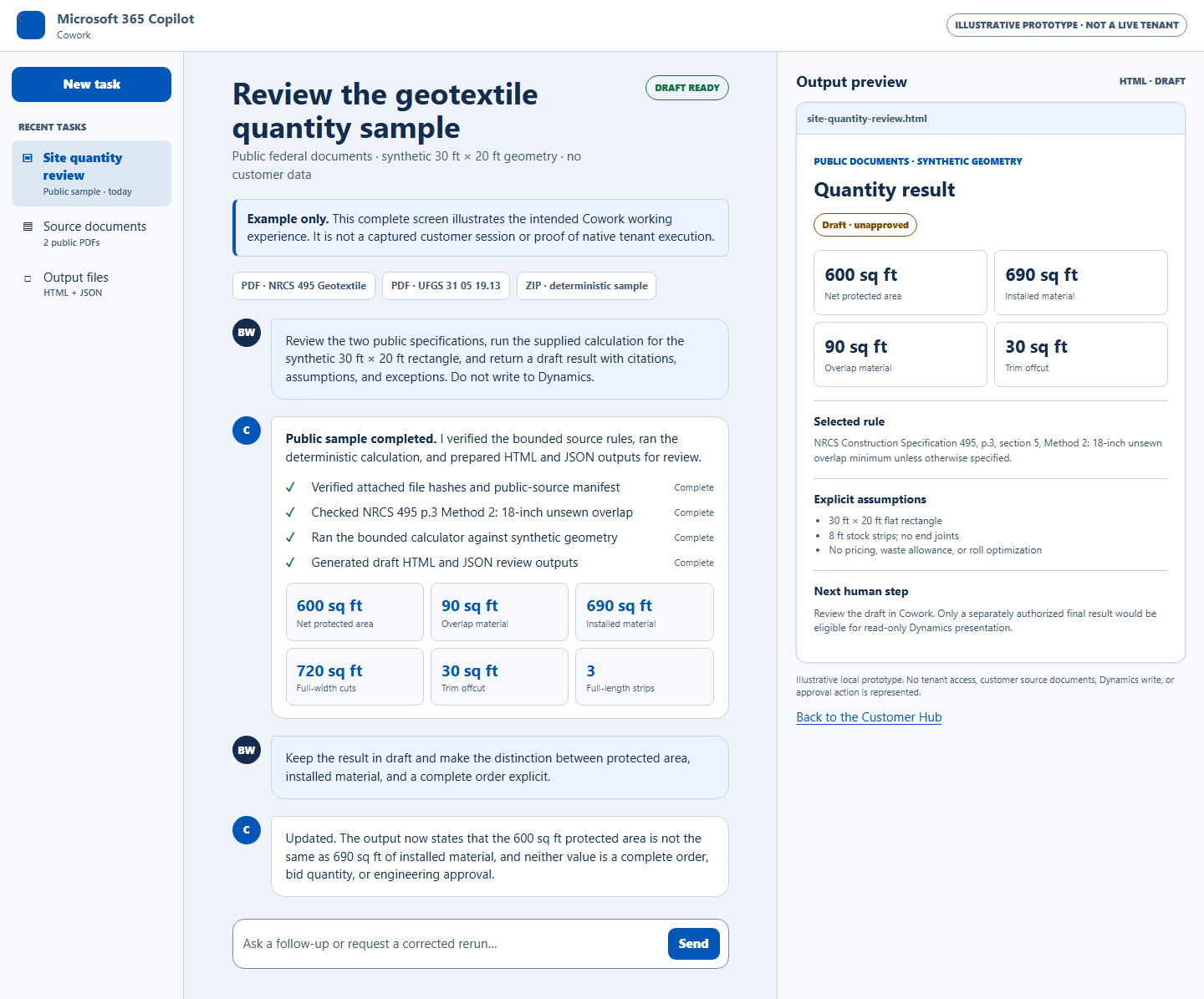
A 30 ft by 20 ft synthetic rectangle using 8 ft stock strips. The two alternatives make the source rule and quantity impact visible before any project-specific use.
No customer drawing or project geometry is used.
Full review views
Two newly rendered, full-page examples show the complete working pattern: Cowork for document review and revisions, then Dynamics for the locked final result. Select either screen to enlarge it or open the complete HTML example.
The complete work surface keeps the authorized files, task progress, source checks, calculation output, questions, and reviewer changes together. The sample remains draft and unapproved throughout this example.
Open the complete Cowork exampleThe complete destination screen keeps the final quantities, evidence, assumptions, and review history visible while disabling edit, approval, and recalculation actions. Corrections route back to Cowork.
Open the complete Dynamics exampleMotion overview
A public-safe explanation of the Cowork-first workflow, deterministic calculation boundaries, read-only Dynamics destination, and review limits for this motion.
Summarizes the business problem, proposed architecture, deterministic analysis behavior, and explicit non-claims.
Open briefDocuments supported deterministic outputs, governed constraints, and why this package avoids private tenant data.
Read boundariesReview assets
Supporting evidence for this walkthrough, including sample-fixture facts, local validation notes, and approved reference material.
Machine-readable summary of motion scope, deterministic analysis claims, and explicit limitations for technical review.
Download fact sheetExplains manual export behavior and review steps using local fixture mode only.
Open notesOfficial guidance for Cowork sessions, file attachments, progress, approvals, output files, and in-session previews.
Open Cowork guidanceOfficial documentation for model-driven app HTML web resources.
Open Microsoft Learn